AI edited your Excel file and the total still looks right. Did it wipe out your SUM formula?
Suppose you ask an AI assistant to update two regional sales cells in a quarterly report. When you open the edited workbook, the total row still reads 40,000,000, so everything looks normal at a glance.
Click that total cell, though, and the formula bar can show a hardcoded integer instead of =SUM(D5:D8). Nothing looks broken today, until next month's numbers fail to roll up.
A GeekNews Korea launch post for Acrylic, an AI chat agent for Excel, Word, and HWP files, made me want a quick way to check for this before trusting any spreadsheet tool with real workbooks.
Upfront boundary: I did not sign into Acrylic or test live edits inside the Acrylic app. Instead, I built a local synthetic workbook generator and a small openpyxl diff script to verify whether four controlled failure cases get caught on disk. (Independent test with no affiliation to Acrylic/Afterimage, Microsoft, OpenAI, or Anthropic.)
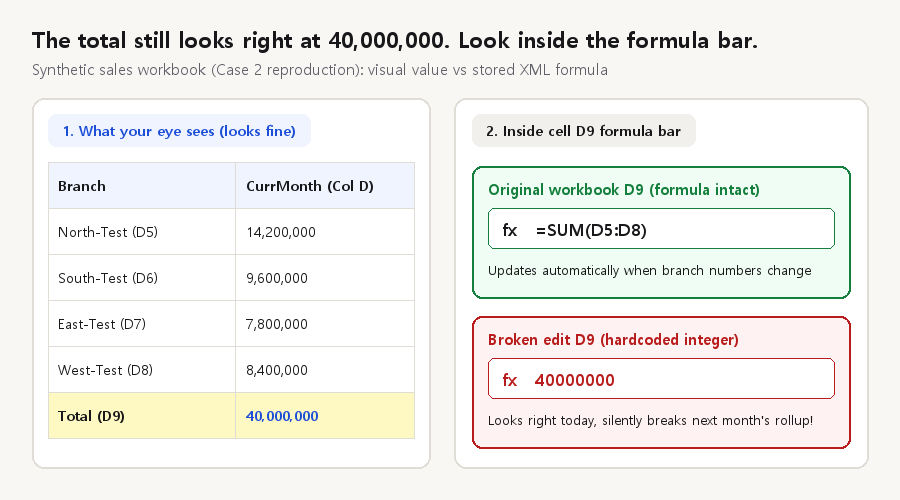
Two checks before uploading a real workbook
Start with data handling. Acrylic's Terms of Service and Privacy Policy (checked 2026-11-25) describe separate cloud and local processing modes, with availability depending on version, OS, and plan.
Since I did not log into the desktop app, I did not check whether local mode is available on my machine. Until your security team clears a tool, test with fake spreadsheets only.
Next, automate the before-and-after diff. Skimming a sheet by eye easily misses a hardcoded total, a nudged neighbor cell, or a stripped currency format. I built a two-sheet synthetic workbook (47 populated cells, 17 formulas, currency and percentage formats, plus a merged A1:F1 banner) and ran four controlled edits locally on Windows 11 with Python 3.14.0 and openpyxl 3.1.5.
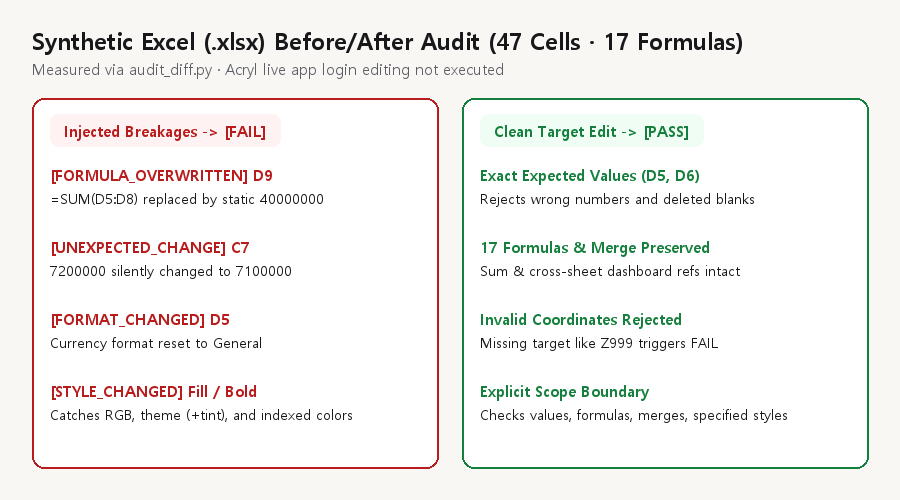
Four synthetic scenarios verified locally
Our saved run log (verification-results.json, run on the 6,708-byte Korean synthetic workbook sample_monthly_sales.xlsx) tested changing only D5 to 14,200,000 and D6 to 9,600,000. The English script below builds the same two-sheet, 47-cell, 17-formula layout (MonthlySales and SummaryDashboard).
| Scenario | Mutation applied | Audit verdict | Violation code(s) caught |
|---|---|---|---|
| Case 1. Clean edit | Updated D5 and D6 to exact expected numbers (all 17 formulas, formats, and merges intact) | PASS (0) | No violations across checked values, formulas, merges, and styles |
| Case 2. Formula overwrite | Updated D5 and D6, then replaced D9's =SUM(D5:D8) with hardcoded 40000000 | FAIL (1) | FORMULA_OVERWRITTEN_WITH_VALUE (D9) |
| Case 3. Neighbor drift and format reset | Changed untouched C7 (7200000 to 7100000) and reset D5 number format to General | FAIL (2) | UNEXPECTED_CELL_CHANGE (C7), NUMBER_FORMAT_CHANGED (D5) |
| Case 4. Unmerge and broken cross-sheet link | Unmerged A1:F1 and replaced the cross-sheet B4 formula with a static integer | FAIL (2) | MERGED_CELLS_CHANGED, FORMULA_OVERWRITTEN_WITH_VALUE |
| Live Acrylic in-app edit | Sign into Acrylic and run live AI chat edits | Not tested | Readers can run the sample file below inside Acrylic and diff the output locally |
One quirk showed up even in the clean Case 1 workbook. Reopening it with data_only=True returned None for all 17 formula cells because openpyxl does not evaluate formulas when writing a file. If an AI tool edits .xlsx files through Python, open and re-save the workbook once in Excel or LibreOffice before passing it to pandas or a BI pipeline.
Try it locally (zero cloud uploads)
Step 1. Create a fresh test folder and install openpyxl
$Stamp = Get-Date -Format "yyyyMMdd_HHmmss"
$TestDir = "excel-ai-audit-$Stamp"
New-Item -ItemType Directory -Path $TestDir -ErrorAction Stop | Out-Null
Set-Location $TestDir
python -m pip install openpyxl
if ($LASTEXITCODE -ne 0) { throw "openpyxl install failed" }
Step 2. Generate the synthetic workbook (make_sample.py)
import sys
from openpyxl import Workbook
from openpyxl.styles import Alignment, Border, Font, PatternFill, Side

if hasattr(sys.stdout, "reconfigure"):
    sys.stdout.reconfigure(encoding="utf-8", errors="replace")

wb = Workbook()
ws = wb.active
ws.title = "MonthlySales"

title_fill = PatternFill(start_color="1F3864", end_color="1F3864", fill_type="solid")
header_fill = PatternFill(start_color="2F5597", end_color="2F5597", fill_type="solid")
total_fill = PatternFill(start_color="D9E1F2", end_color="D9E1F2", fill_type="solid")
thin = Side(style="thin", color="BFBFBF")
border = Border(left=thin, right=thin, top=thin, bottom=thin)

ws.merge_cells("A1:F1")
ws["A1"] = "[SYNTHETIC TEST] Q4 Regional Sales Report"
ws["A1"].font = Font(name="Calibri", size=13, bold=True, color="FFFFFF")
ws["A1"].fill = title_fill
ws["A1"].alignment = Alignment(horizontal="center", vertical="center")

ws["A2"] = "100% synthetic test data (not real company figures)"
ws["A2"].font = Font(name="Calibri", size=9, italic=True, color="595959")

for col, text in enumerate(["Branch", "Target", "PrevMonth", "CurrMonth", "Attainment", "Status"], 1):
    c = ws.cell(row=4, column=col, value=text)
    c.font = Font(name="Calibri", size=10, bold=True, color="FFFFFF")
    c.fill = header_fill
    c.border = border

rows = [
    ("North-Test", 13000000, 11800000, 12500000),
    ("South-Test", 9500000, 8600000, 8900000),
    ("East-Test", 7500000, 7200000, 7800000),
    ("West-Test", 8500000, 8100000, 8400000),
]
num_fmt, pct_fmt = "#,##0", "0.0%"
for i, (name, goal, prev_m, curr_m) in enumerate(rows, 5):
    ws.cell(i, 1, name)
    ws.cell(i, 2, goal).number_format = num_fmt
    ws.cell(i, 3, prev_m).number_format = num_fmt
    ws.cell(i, 4, curr_m).number_format = num_fmt
    ws.cell(i, 5, f"=IF(B{i}=0,0,D{i}/B{i})").number_format = pct_fmt
    ws.cell(i, 6, f'=IF(D{i}>=B{i},"Hit","Miss")')
    for col in range(1, 7):
        ws.cell(i, col).font = Font(name="Calibri", size=10)
        ws.cell(i, col).border = border

ws.cell(9, 1, "Total")
ws.cell(9, 2, "=SUM(B5:B8)").number_format = num_fmt
ws.cell(9, 3, "=SUM(C5:C8)").number_format = num_fmt
ws.cell(9, 4, "=SUM(D5:D8)").number_format = num_fmt
ws.cell(9, 5, "=IF(B9=0,0,D9/B9)").number_format = pct_fmt
ws.cell(9, 6, '=IF(D9>=B9,"TargetHit","Miss")')
for col in range(1, 7):
    ws.cell(9, col).font = Font(name="Calibri", size=10, bold=True)
    ws.cell(9, col).fill = total_fill
    ws.cell(9, col).border = border

ws2 = wb.create_sheet("SummaryDashboard")
ws2["A1"] = "Executive Summary (Linked to MonthlySales)"
ws2["A1"].font = Font(name="Calibri", size=12, bold=True)
for i, (label, formula, fmt) in enumerate([
    ("Total Target", "=MonthlySales!B9", num_fmt),
    ("Total Current Sales", "=MonthlySales!D9", num_fmt),
    ("Overall Attainment", "=MonthlySales!E9", pct_fmt),
    ("Branches Hit", '=COUNTIF(MonthlySales!F5:F8,"Hit")', "0"),
], 3):
    ws2.cell(i, 1, label).font = Font(name="Calibri", size=10, bold=True)
    ws2.cell(i, 1).border = border
    c = ws2.cell(i, 2, formula)
    c.font = Font(name="Calibri", size=10)
    c.number_format = fmt
    c.border = border

wb.save("sample_monthly_sales.xlsx")
print("[OK] Created sample_monthly_sales.xlsx")
python -X utf8 make_sample.py
if ($LASTEXITCODE -ne 0) { throw "Sample generation failed" }
Step 3. Have your AI tool edit 2 cells and save as edited_by_ai.xlsx
Give your AI tool this exact prompt:
"InMonthlySales, update onlyD5(North-Test) to14200000andD6(South-Test) to9600000. Do not touch any other cell, SUM or cross-sheet formula, number format, fill color, or merged range."
Step 4. Run the expected-value diff auditor (audit_diff.py)
Checking only whether a target cell "changed" misses wrong numbers and accidental deletions. This script verifies exact expected target values, rejects non-existent coordinates like Z999, and catches RGB, Excel theme (including tint), and indexed color changes on both cell fills and fonts.
import re
import sys
from openpyxl import load_workbook

if hasattr(sys.stdout, "reconfigure"):
    sys.stdout.reconfigure(encoding="utf-8", errors="replace")

COORD_RE = re.compile(r"^[A-Z]{1,3}[1-9][0-9]{0,6}$")

def is_formula(v):
    return isinstance(v, str) and v.startswith("=")

def norm_ref(ref, default_sheet):
    ref = ref.strip()
    if "!" in ref:
        s, coord = ref.split("!", 1)
        return f"{s.strip().strip(chr(39))}!{coord.strip().upper()}"
    return f"{default_sheet}!{ref.upper()}"

def parse_val(raw):
    s = raw.strip()
    if s == "" or s.lower() == "none":
        return None
    try:
        return float(s) if "." in s else int(s)
    except ValueError:
        return s

def color_sig(color):
    if color is None:
        return "none"
    ctype = getattr(color, "type", None)
    if ctype == "rgb":
        return f"rgb:{color.rgb}"
    if ctype == "theme":
        tint = round(float(getattr(color, "tint", 0.0) or 0.0), 4)
        return f"theme:{color.theme}:{tint}"
    if ctype == "indexed":
        return f"indexed:{color.indexed}"
    return f"{ctype or 'none'}"

def fill_sig(cell):
    fill = cell.fill
    if not fill or not fill.fill_type:
        return "none"
    return f"{fill.fill_type}:{color_sig(fill.fgColor)}"

def font_sig(cell):
    font = cell.font
    if not font:
        return (False, "none")
    return (bool(font.bold), color_sig(font.color))

def audit(before_path, after_path, expect_items):
    wb_b = load_workbook(before_path, data_only=False)
    wb_a = load_workbook(after_path, data_only=False)
    wb_val = load_workbook(after_path, data_only=True)
    default_sheet = wb_b.sheetnames[0]
    before_sheets = set(wb_b.sheetnames)
    after_sheets = set(wb_a.sheetnames)
    issues = []

    expected = {}
    for item in expect_items:
        part = item.strip()
        if not part:
            continue
        if "=" not in part:
            issues.append(f"[BAD_EXPECT_FORMAT] '{part}' -> use Sheet!Cell=Value")
            continue
        ref_raw, val_raw = part.split("=", 1)
        norm = norm_ref(ref_raw, default_sheet)
        s_name, coord = norm.split("!", 1)
        if s_name not in before_sheets or not COORD_RE.match(coord):
            issues.append(f"[TARGET_INVALID] {norm}: invalid sheet or coordinate")
        else:
            expected[norm] = parse_val(val_raw)

    if before_sheets != after_sheets:
        issues.append(f"[SHEET_DIFF] {wb_b.sheetnames} -> {wb_a.sheetnames}")

    cells_checked, formulas_checked, cached_none = 0, 0, 0
    visited_targets = set()

    for sname in wb_b.sheetnames:
        if sname not in after_sheets:
            continue
        ws_b, ws_a, ws_v = wb_b[sname], wb_a[sname], wb_val[sname]
        mb = sorted(str(r) for r in ws_b.merged_cells.ranges)
        ma = sorted(str(r) for r in ws_a.merged_cells.ranges)
        if mb != ma:
            issues.append(f"[MERGED_CHANGED] {sname}: {mb} -> {ma}")

        for r in range(1, max(ws_b.max_row, ws_a.max_row) + 1):
            for c in range(1, max(ws_b.max_column, ws_a.max_column) + 1):
                cb, ca = ws_b.cell(r, c), ws_a.cell(r, c)
                if cb.value is None and ca.value is None:
                    continue
                cells_checked += 1
                loc = f"{sname}!{cb.coordinate}"
                if loc in expected:
                    visited_targets.add(loc)
                if is_formula(cb.value):
                    formulas_checked += 1
                    if is_formula(ca.value) and ws_v.cell(r, c).value is None:
                        cached_none += 1

                if is_formula(cb.value) and not is_formula(ca.value):
                    issues.append(f"[FORMULA_OVERWRITTEN] {loc}: {cb.value!r} -> {ca.value!r}")
                elif is_formula(cb.value) and cb.value != ca.value and loc not in expected:
                    issues.append(f"[FORMULA_MODIFIED] {loc}: {cb.value!r} -> {ca.value!r}")
                elif loc in expected:
                    if ca.value != expected[loc]:
                        issues.append(f"[TARGET_VALUE_MISMATCH] {loc}: expected {expected[loc]!r} != actual {ca.value!r}")
                elif cb.value != ca.value:
                    issues.append(f"[UNEXPECTED_CHANGE] {loc}: {cb.value!r} -> {ca.value!r}")

                if cb.value is not None:
                    if cb.number_format != ca.number_format:
                        issues.append(f"[FORMAT_CHANGED] {loc}: {cb.number_format!r} -> {ca.number_format!r}")
                    b_style = (font_sig(cb), fill_sig(cb))
                    a_style = (font_sig(ca), fill_sig(ca))
                    if b_style != a_style:
                        issues.append(f"[STYLE_CHANGED] {loc}: {b_style} -> {a_style}")

    for missing in sorted(set(expected.keys()) - visited_targets):
        issues.append(f"[TARGET_NOT_FOUND] {missing}: empty in both workbooks")

    wb_b.close()
    wb_a.close()
    wb_val.close()
    print(f"Checked: {cells_checked} cells · {formulas_checked} formulas (cached None: {cached_none})")
    if issues:
        print(f"[FAIL] {len(issues)} violation(s) found:")
        for line in issues:
            print("  -", line)
        return 1
    print("[PASS] No violations across checked values, formulas, merges, number formats, font weight/color, or fill colors")
    return 0

if __name__ == "__main__":
    if len(sys.argv) < 4:
        print('Usage: python -X utf8 audit_diff.py <before.xlsx> <after.xlsx> "MonthlySales!D5=14200000,MonthlySales!D6=9600000"')
        sys.exit(2)
    sys.exit(audit(sys.argv[1], sys.argv[2], sys.argv[3].split(",")))
python -X utf8 audit_diff.py sample_monthly_sales.xlsx edited_by_ai.xlsx "MonthlySales!D5=14200000,MonthlySales!D6=9600000"
(Scope note: this auditor checks values, formulas, merged ranges, number formats, font bold and color, and fill colors across RGB, theme with tint, and indexed palettes. It does not check hidden rows, print areas, or sheet order, so do a quick visual scan in Excel before sending.)
Four pitfalls to watch for
| Pitfall | Why it happens | Practical fix |
|---|---|---|
| Totals look right today, break next month | An edit replaced =SUM(D5:D8) with a static number | Inspect formula strings with data_only=False via audit_diff.py |
Formula cells read as None in pandas or BI | openpyxl does not evaluate formulas when saving | Open and re-save once in Excel or LibreOffice to refresh cached values |
UnicodeEncodeError on Windows shells | Non-UTF-8 console codepages such as cp1252 | Run with python -X utf8 and keep sys.stdout.reconfigure |
| Cloud upload clashes with company policy | Cloud AI tools transmit workbook contents externally | Read vendor Terms and Privacy first and test only with synthetic files until approved |
Have you ever caught an AI tool silently overwriting a formula or breaking formatting in a workbook? If you test your setup against this script, share what passed or failed.
Sources and free sharing notice
- Discovery source: GeekNews Korea: Show GN Acrylic (original local synthetic verification suite; no source text copied)
- Acrylic official pages: acrylichq.com · Pricing · Terms of Service · Privacy Policy
- openpyxl documentation: openpyxl.readthedocs.io
This free guide may be shared and redistributed freely for personal, community, workplace, or educational use as long as the content is not altered and original attribution (AI Playbook Lab and source URL) is kept intact. Commercial resale is prohibited.