Before Moving Your Family Photos, I Tested Immich v3.4.2 With 10 Synthetic Photos First
Thinking about ditching Google Photos storage fees by spinning up Immich on a spare PC or NAS?
Do not copy your real family archive over on day one. The moment you self-host your photo library, you also own every failure mode—dead drives, broken upgrades, and backups that turn out to be empty when you actually need them.
So I did not touch a single personal photo. I generated 10 synthetic test JPEGs (316.4 KB total), dropped them into an isolated Docker sandbox running pinned Immich v3.4.2, and measured real RAM usage, search latency, duplicate rejection, and database dump output in 10 minutes.
One boundary upfront: this test covers isolated boot, upload, duplicate detection, metadata/smart search responses, and 2-step DB dump verification. It does not cover restoring that dump into a blank instance (live restore was NOT tested in Part 1). Run a restore drill on a spare folder before trusting any self-hosted server with real memories. (Independent test — no affiliation with Google Photos, Immich, Docker, or Valkey.)
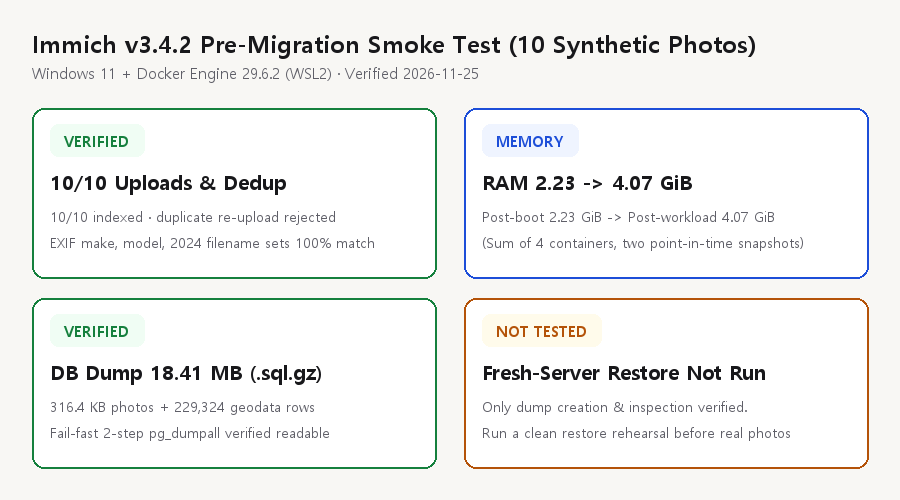
4 Things 10 Fake Photos Revealed Immediately
Memory footprint stood out first. With just 10 synthetic files uploaded, the four containers used 2.23 GiB right after boot and climbed to 4.07 GiB (1 GiB = 1024 MiB) right after upload, smart search, and dump checks. Immich's official docs list 6 GB minimum (8 GB recommended) and suggest disabling machine learning on machines with 4 GB or less.
Core ingestion and metadata filtering were solid. All 10 test images indexed cleanly, re-uploading image #1 was rejected immediately as duplicate, and EXIF queries matched both counts and exact filename sets 100% (10 total, 4 from year 2024, 4 with make SynthCam, 2 with model Model-A1).
AI smart search needed patience—and a reality check. Querying "mountain sunrise" 10 seconds after upload returned HTTP 200 with 0 results. Retrying 36.1 seconds later returned HTTP 200 with 10 results, but the top rank among simple geometric synthetic images was a drawn cat (synth_08_cat_sofa.jpg). This confirms the search API responds; it does not evaluate retrieval accuracy on real photographs. On an earlier fresh-boot attempt, the ML container also threw HTTP 500 while preparing CLIP ViT-B-32, so verify ML health on your own hardware before migrating.
Database backup size also surprised me. Even though the photos totaled 316.4 KB, the PostgreSQL pg_dumpall dump measured 53.25 MB raw and 18.41 MB gzipped because Immich seeds 229,324 geodata rows into Postgres on initial boot (4.15 seconds in this run).
Should You Run This on Your Hardware?
If you are comfortable with Docker Compose and have at least 8 GB of RAM, a 10-minute sandbox test is worth doing. Immich is open source under GNU AGPL v3 with all core features free; the team's optional supporter keys (~$25 personal / ~$100 server) do not lock features.
If you do not want to check backups or read release notes before upgrades, a paid cloud photo plan is honestly cheaper in time and peace of mind.
| Requirement | Official Docs | Observed on 2026-11-25 |
|---|---|---|
| Software Cost | Free (GNU AGPL v3) | All core features free; supporter keys optional |
| Memory (RAM) | Min 6 GB / Rec 8 GB | 4.07 GiB peak with 10 test photos + ML enabled |
| CPU | Min 2 cores / Rec 4 cores | amd64 ML container requires x86-64-v2 or newer |
| Filesystem | Linux EXT4/ZFS/BTRFS recommended | On Windows tests, keep Postgres in a Docker Named Volume (never raw NTFS bind mount) |
Verified Numbers and What Was Not Tested
All metrics below come directly from our saved run log (verification-results.json, 2026-11-25, Windows 11 + Docker Engine 29.6.2 WSL2, pinned v3.4.2).
| Check | Status | Observed Result |
|---|---|---|
| Isolated boot & health | Tested | Ping responded 8.05s after script polling started; /api/server/about returned 401 unauth, v3.4.2 after login |
| 10 synthetic uploads & dedup | Tested | 10/10 indexed (316.4 KB); duplicate re-upload rejected (duplicate) |
| 3 EXIF metadata queries | Tested | 100% exact filename set match across all 10 / SynthCam (4) / Model-A1 (2) / year 2024 (4) |
| AI smart search | Response checked (accuracy not evaluated) | Attempt 1 (+10s): 200 / 0 hits -> Attempt 2 (+36.1s): 200 / 10 hits (#1 synth_08_cat_sofa.jpg; earlier run saw HTTP 500) |
| 2-step DB dump & gunzip verify | Tested | .sql.gz 18.41 MB (53.25 MB raw); confirmed CREATE TABLE and sample filenames inside |
| Clean-instance Restore | Not tested | Stopped after dump integrity check; run a restore rehearsal before real migration |
Point-in-time docker stats --no-stream readings (binary GiB):
| Container | Pinned Image | Right After Boot | After Upload + Search + Dump |
|---|---|---|---|
immich-server | immich-server:v3.4.2 | 1.615 GiB | 1.779 GiB |
immich-machine-learning | immich-machine-learning:v3.4.2 | 209.4 MiB (0.205 GiB) | 1.678 GiB |
database | postgres:14-vectorchord0.4.3-pgvectors0.2.0 | 410.6 MiB (0.401 GiB) | 612.1 MiB (0.598 GiB) |
redis | valkey/valkey:9 | 9.07 MiB (0.009 GiB) | 12.34 MiB (0.012 GiB) |
| Total | 4 containers | 2.23 GiB | 4.07 GiB |
Inside ./library, Immich creates six subfolders, each containing a 13-byte .immich marker file used to detect broken mounts. Keep those hidden files intact during backups.
| Subfolder | File Count | Size | 3-2-1 Backup Priority |
|---|---|---|---|
upload/ | 11 (10 originals + .immich) | 324,014 B | Required |
library/ | 1 (.immich) | 13 B | Required |
profile/ | 1 (.immich) | 13 B | Recommended |
backups/ | 1 (.immich) | 13 B | Required (or external pg_dumpall) |
thumbs/ | 21 (20 thumbs + .immich) | 291,248 B | Optional (regenerable) |
encoded-video/ | 1 (.immich) | 13 B | Optional (regenerable) |
Isolated Safe Sandbox Walkthrough (Windows PowerShell)
To avoid colliding with any existing Docker stack, this walkthrough creates a timestamped directory, generates a random 24-character database password at runtime, and pins both ./library:/data and :v3.4.2 directly inside docker-compose.yml so shell environment variables (UPLOAD_LOCATION, IMMICH_VERSION) cannot silently hijack your test.
Step 1. Create an Isolated Folder and Random .env
$Stamp = Get-Date -Format "yyyyMMdd_HHmmss"
$TestDir = "immich-pretest-$Stamp"
$Project = "immich_pretest_$Stamp"

New-Item -ItemType Directory -Path $TestDir -ErrorAction Stop | Out-Null
Set-Location $TestDir

$DbPass = -join ((48..57 + 65..90 + 97..122) | Get-Random -Count 24 | ForEach-Object { [char]$_ })
@"
TZ=UTC
DB_PASSWORD=$DbPass
DB_USERNAME=postgres
DB_DATABASE_NAME=immich
"@ | Set-Content -Path ".env" -Encoding utf8

Write-Host "Sandbox folder: $(Get-Location) / Project: $Project"
Step 2. Save docker-compose.yml
No top-level name: or container_name: is hardcoded, so -p $Project isolates containers, networks, and named volumes cleanly.
services:
  immich-server:
    image: ghcr.io/immich-app/immich-server:v3.4.2
    volumes:
      - ./library:/data
    env_file:
      - .env
    ports:
      - '127.0.0.1:22830:2283'
    depends_on:
      - redis
      - database
    restart: 'no'
    healthcheck:
      disable: false

  immich-machine-learning:
    image: ghcr.io/immich-app/immich-machine-learning:v3.4.2
    volumes:
      - sandbox-model-cache:/cache
    env_file:
      - .env
    environment:
      MACHINE_LEARNING_MODEL_REVISION: v2
    restart: 'no'
    healthcheck:
      disable: false

  redis:
    image: docker.io/valkey/valkey:9@sha256:418652cfb58ef879d4978c33553735d7147016032d5aefaa14c828e611eb9dfd
    healthcheck:
      test: redis-cli ping | grep -q PONG || exit 1
    restart: 'no'

  database:
    image: ghcr.io/immich-app/postgres:14-vectorchord0.4.3-pgvectors0.2.0@sha256:bcf63357191b76a916ae5eb93464d65c07511da41e3bf7a8416db519b40b1c23
    environment:
      POSTGRES_PASSWORD: ${DB_PASSWORD}
      POSTGRES_USER: ${DB_USERNAME}
      POSTGRES_DB: ${DB_DATABASE_NAME}
      POSTGRES_INITDB_ARGS: '--data-checksums'
    volumes:
      - sandbox-pgdata:/var/lib/postgresql/data
    shm_size: 128mb
    restart: 'no'
    healthcheck:
      disable: false

volumes:
  sandbox-model-cache:
  sandbox-pgdata:
Step 3. Boot and Fail-Fast Readiness Check (60s)
docker compose -p $Project up -d
if ($LASTEXITCODE -ne 0) { throw "docker compose up failed" }

$deadline = (Get-Date).AddSeconds(60)
$ready = $false
while ((Get-Date) -lt $deadline) {
  try {
    $res = Invoke-RestMethod -Uri "http://127.0.0.1:22830/api/server/ping" -TimeoutSec 3
    if ($res.res -eq "pong") { $ready = $true; break }
  } catch {}
  Start-Sleep -Seconds 2
}

if (-not $ready) {
  docker compose -p $Project ps
  docker compose -p $Project logs --tail 30 immich-server
  throw "Immich did not respond within 60s. Inspect the logs above before continuing."
}
Write-Host "Immich is ready."
Step 4. Upload 10 Test Photos and Run a Fail-Fast 2-Step Backup
Open http://127.0.0.1:22830, create a throwaway admin account, upload 10 test images, try re-uploading one to confirm duplicate blocking, and test search. Then dump Postgres without letting a pipe (pg_dumpall | gzip) hide failures or PowerShell > corrupt binary streams:
docker compose -p $Project exec -T database sh -c "pg_dumpall --clean --if-exists --username=postgres > /tmp/immich_test_dump.sql && test -s /tmp/immich_test_dump.sql"
if ($LASTEXITCODE -ne 0) { throw "pg_dumpall failed — backup aborted" }

docker compose -p $Project exec -T database gzip -f /tmp/immich_test_dump.sql
if ($LASTEXITCODE -ne 0) { throw "gzip failed" }

docker compose -p $Project cp database:/tmp/immich_test_dump.sql.gz .\immich_test_dump.sql.gz
if ($LASTEXITCODE -ne 0) { throw "docker compose cp failed" }
docker compose -p $Project exec -T database rm -f /tmp/immich_test_dump.sql.gz
Step 5. Tear Down Safely
docker compose -p $Project down -v
This removes only $Project's four containers, network, and Docker Named Volumes (sandbox-pgdata, sandbox-model-cache). Local files (./library, ./immich_test_dump.sql.gz, .env, docker-compose.yml) stay inside your sandbox folder so you can double-check the path before deleting it manually.
4 Common Gotchas
| Symptom | Cause | Fix |
|---|---|---|
| Old blog Compose YAML fails to start | Immich v3 switched to /data, valkey:9, and vectorchord Postgres | Use official latest release Compose or the pinned v3.4.2 block above |
| Postgres permission errors on Windows | Binding a raw NTFS folder directly to /var/lib/postgresql/data | Use a Docker Named Volume for Windows tests; prefer Linux for 24/7 hosting |
Corrupted or empty .sql.gz on Windows | pg_dumpall | gzip hides upstream exit codes and PowerShell > writes UTF-16 | Use the 2-step dump + test -s + gzip + docker compose cp flow above |
| Smart search returns 0 hits or initial 500 | Indexing lag (36.1s here) or ML model warmup issue | Wait 1–2 minutes and retry; check docker compose -p $Project logs immich-machine-learning |
If you already run Immich on a NAS or mini-PC, what tripped you up the most when you tried your first real restore? Let me know so I can test those exact failure modes in the Part 2 restore drill.
Sources & Free Sharing Notice
- Topic inspiration: NetworkChuck — you need to self-host Google Photos RIGHT NOW!! (original hands-on sandbox test with 10 synthetic images; no transcript or text copied)
- Official Immich docs: Requirements · Docker Compose · Backup & Restore · GNU AGPL v3 License
This free guide may be shared and redistributed freely for personal, community, workplace, or educational use as long as the content is not altered and original attribution (AI Playbook Lab and source URL) is kept intact. Commercial resale is prohibited.